It’s easy to add a newsfeed to a Mambo or Joomla website. The normal place for them is on the right hand column of a 3 column layout. In this example we’re doing just that.
- To get started login to the admin panel
- Click on Modules, then Site Modules and you’ll get a list of all the modules you have installed.
- Click on the New button – no need to select a type or copy an existing module, New will do it all.
- Fill in the new screen with the required information.
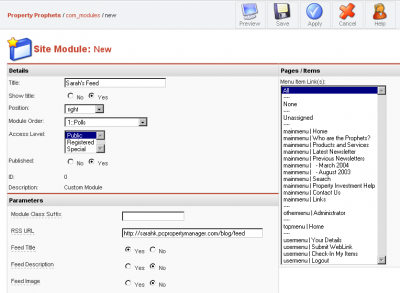
(click to enlarge)
Leave off anything that doesn’t make sense – all the necessary fields are shown in the screen shot – except the cache option – I recommend you turn that on. - Save and check your site

Mucking about, test comment
http://www.dummies-guide-to-dmoz.org/wordpress/2005/08/25/under-construction-rant/